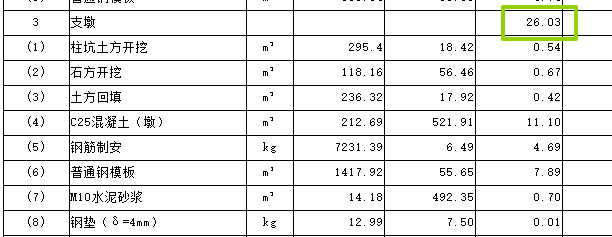
问题:这些值加起来是26.02,但是软件上面显示的是26.03,这个问题非常之多,如果我们导表出来自己手动加的话会给我们增加超级大的工作量,所以我觉得你们真的很有必要研究一下给我们解决一下这个问题。
解决办法:通过导出excel链接表,然后在excel中通过宏批量修改公式解决;
公式修改:由

修改为:

VBA宏代码:
Option Explicit

Sub ConvertRoundDivToRound2()
    ' 功能:将当前列中 "=ROUND(...,0)/10000" 公式转换为 "=ROUND((...)/10000,2)"
    ' 注意:精度从 0 改为 2,结果可能与原公式不同
    Dim ws As Worksheet
    Dim targetCol As Long
    Dim lastRow As Long
    Dim cell As Range
    Dim oldFormula As String
    Dim newFormula As String
    Dim convertCount As Long
    Dim exampleMsg As String

    If ActiveCell Is Nothing Then
        MsgBox "请先选中一个单元格。", vbExclamation
        Exit Sub
    End If

    Set ws = ActiveCell.Worksheet
    targetCol = ActiveCell.Column
    lastRow = ws.Cells(ws.Rows.Count, targetCol).End(xlUp).Row

    If lastRow = 1 And IsEmpty(ws.Cells(1, targetCol)) Then
        MsgBox "所选列无数据。", vbInformation
        Exit Sub
    End If

    ' 关闭屏幕刷新与自动计算(提升速度)
    Application.ScreenUpdating = False
    Application.Calculation = xlCalculationManual

    convertCount = 0
    For Each cell In ws.Range(ws.Cells(1, targetCol), ws.Cells(lastRow, targetCol))
        If cell.HasFormula Then
            oldFormula = cell.Formula
            newFormula = ConvertRoundDivFormula(oldFormula)
            If newFormula <> "" And newFormula <> oldFormula Then
                cell.Formula = newFormula
                convertCount = convertCount + 1
                If convertCount = 1 Then
                    exampleMsg = oldFormula & vbCrLf & "→" & vbCrLf & newFormula
                End If
            End If
        End If
    Next cell

    ' 恢复自动计算并强制全工作簿重算
    Application.Calculation = xlCalculationAutomatic
    Application.CalculateFullRebuild
    Application.ScreenUpdating = True

    If convertCount > 0 Then
        Dim ans As VbMsgBoxResult
        ans = MsgBox("已转换 " & convertCount & " 个公式。" & vbCrLf & _
                     "注意:精度改为2后,结果可能与原来不同。" & vbCrLf & _
                     "示例:" & vbCrLf & exampleMsg & vbCrLf & vbCrLf & _
                     "是否继续?如需撤销请按 Ctrl+Z。", _
                     vbYesNo + vbExclamation, "转换完成")
    Else
        MsgBox "未找到匹配的公式。要求:以 =ROUND(...,0)/10000 结尾(逗号或分号分隔)。", vbInformation
    End If
End Sub

' 辅助函数:转换单个公式字符串,新公式使用精度2
Function ConvertRoundDivFormula(ByVal formulaStr As String) As String
    Dim s As String
    Dim sep As String
    Dim startPos As Long, i As Long, bracketCount As Long
    Dim paramStart As Long, rightParenPos As Long
    Dim innerPart As String, exprPart As String

    ' 移除所有空格
    s = Replace(formulaStr, " ", "")

    ' 判断参数分隔符(逗号或分号)
    If InStr(s, ",") > 0 Then
        sep = ","
    ElseIf InStr(s, ";") > 0 Then
        sep = ";"
    Else
        Exit Function
    End If

    ' 基本格式检查:以 "=ROUND(" 开头,以 "/10000" 结尾
    If Left(s, 7) <> "=ROUND(" Then Exit Function
    If Right(s, 6) <> "/10000" Then Exit Function

    paramStart = 8
    bracketCount = 1
    rightParenPos = 0

    ' 查找与 ROUND 左括号匹配的右括号位置
    For i = paramStart To Len(s)
        Select Case Mid(s, i, 1)
            Case "("
                bracketCount = bracketCount + 1
            Case ")"
                bracketCount = bracketCount - 1
                If bracketCount = 0 Then
                    rightParenPos = i
                    Exit For
                End If
        End Select
    Next i

    If rightParenPos = 0 Then Exit Function

    ' 提取 ROUND 括号内的完整参数部分(例如 "$P$23*$R$23,0")
    innerPart = Mid(s, paramStart, rightParenPos - paramStart)

    ' 检查第二个参数是否为数字0(允许前后有空格,但我们已经去掉了空格)
    If Not (Right(innerPart, Len(sep) + 1) = sep & "0") Then Exit Function

    ' 提取第一个参数表达式(去掉最后的 ",0" 或 ";0")
    exprPart = Left(innerPart, Len(innerPart) - (Len(sep) + 1))
    If Trim(exprPart) = "" Then Exit Function

    ' 构造新公式:精度固定为2,使用英文逗号作为分隔符(Excel标准)
    ConvertRoundDivFormula = "=ROUND((" & exprPart & ")/10000,2)"
End Function
使用步骤:
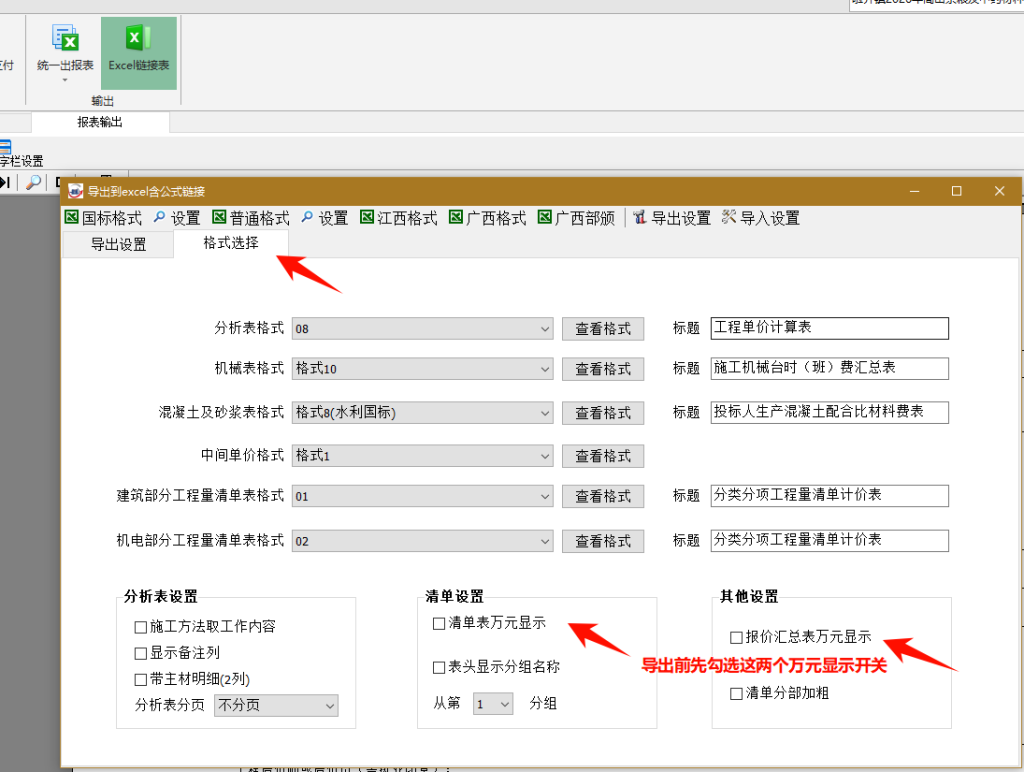
1.导出excel链接表;
2.鼠标点中excel公式列的一个格,执行宏;